Restaurants and cafes need more than a basic billing app. During lunch rush or evening service, the team must capture orders quickly, send them to the kitchen clearly, track table flow, manage modifiers, and complete payment without confusion.
That is why many owners searching for the best POS system in Sri Lanka realize that food service needs a very different workflow from normal retail. SmartBillPos is built for that through a restaurant mode that treats billing as order capture, kitchen coordination, and service flow, not just invoice printing.
What a Restaurant POS Must Do Well
A strong restaurant POS should support the full service cycle:
- capture orders quickly
- assign dine-in orders to tables
- support takeaway and delivery flows
- send Kitchen Order Tickets clearly
- track order ownership
- update kitchen status
- handle modifiers and notes
- complete billing at the right stage
These are the basics restaurant owners should expect from a serious POS system in Sri Lanka for food businesses.
Why Restaurants Outgrow Generic Billing Tools
Many restaurants begin with a simple billing setup because it feels cheaper or easier. The problem appears when operations get busier:
- dine-in and takeaway orders get mixed up
- kitchen instructions are missed
- tables are harder to track
- bill edits become messy
- order ownership is unclear
At that point, the software is no longer just a billing issue. It becomes a service issue.
How SmartBillPos Restaurant Mode Works
Restaurant operations are usually not a single straight line. A branch may have two inventory paths:
Path A: Raw Material to Production to Sale
purchase raw materials -> stock ingredients -> production or recipe -> sell dish
Path B: Direct Purchase to Sale
purchase finished item -> stock -> sale
This matters because a restaurant may sell both prepared dishes and direct-sale items such as bottled drinks or snacks. SmartBillPos is designed to support that reality.
What SmartBillPos Solves for Restaurants and Cafes
Order-Type Based Billing
In restaurant mode, billing should behave like order capture. SmartBillPos can support workflows around:
- Dine In
- Takeaway
- Delivery
- Counter
This helps the team understand how each order should move through service.
Dining Table and Table or Token Flow
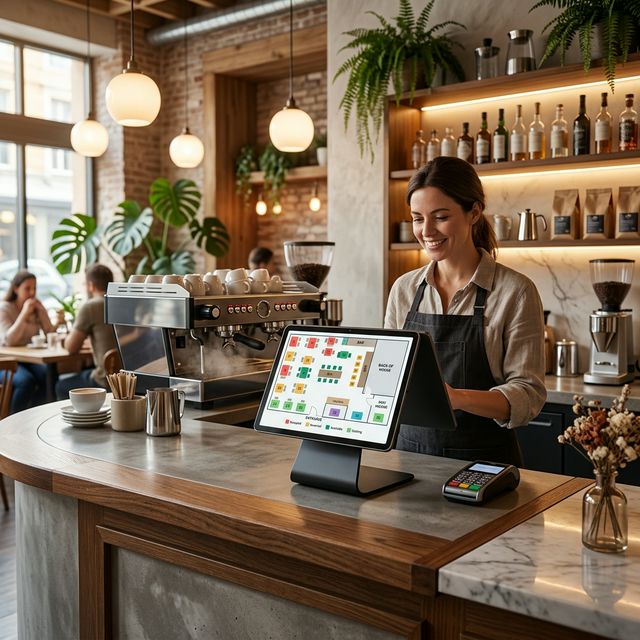
Restaurant staff need a practical way to link orders to the correct place. SmartBillPos supports both configured dining tables and a fallback table or token reference.
That helps with:
- dine-in table assignment
- takeaway token workflows
- easier order lookup
- cleaner handoff between staff
Order Staff and Kitchen Status
Restaurants need more than cashier visibility. They need operational ownership.
SmartBillPos can support restaurant fields such as:
- order staff
- kitchen status
This helps the branch track who took the order and where it is in the kitchen cycle.
Typical kitchen statuses include:
- Pending
- Preparing
- Ready
- Served
- Not Required
KOT Workflow and Better Kitchen Communication
The restaurant flow should work like a KOT system:
- Staff captures the order.
- The order goes to the kitchen.
- The kitchen prepares the items.
- Kitchen status is updated.
- Front-of-house serves the table or hands over the order.
- Payment is completed when appropriate.
This is a major reason restaurants choose restaurant-ready software instead of generic billing tools.
Menu Modifiers Instead of Product Duplication
Restaurant customization should usually be handled with modifiers, not by creating a separate product for every variation.
For example, one menu item may need modifier groups such as:
- protein
- spice level
- add-ons
That keeps the menu cleaner while still helping the kitchen receive clearer instructions.
Better Order Editing
Restaurant orders change often. A useful system must support controlled edits such as:
- adding dishes
- removing items
- changing modifiers
- moving tables
- updating kitchen status
- changing payment state
SmartBillPos supports this kind of real restaurant workflow much more naturally than a simple invoice-only tool.
What Restaurants Should Compare Before Buying
1. Is it built for restaurant workflow?
Look for tables, modifiers, order staff, kitchen status, and KOT-friendly behavior.
2. Can the team learn it quickly?
The best system is one staff can use confidently during rush periods.
3. Does it support both service and stock logic?
Restaurants often sell both menu items and direct-sale products.
4. Is support practical and local?
Food businesses need help during real business hours, not delayed responses.
5. Can it scale from one outlet to several?
Branch growth should not require a completely different system later.
If you want to compare plan value directly, see the SmartBillPos pricing page.
Is SmartBillPos POS a Good Fit for Small Restaurants?
Yes. SmartBillPos POS works well for:
- cafes
- bakeries
- takeaway counters
- family restaurants
- dine-in outlets
- growing multi-branch food businesses
You can explore broader use cases on the Industries page.
Final Thoughts
The best POS system in Sri Lanka for a restaurant is the one that helps the team take orders faster, communicate better with the kitchen, manage tables clearly, and complete billing without confusion.
SmartBillPos does that by combining order-type based billing, table handling, KOT-style workflow, modifiers, and kitchen status visibility in one platform. If you want to see whether it fits your menu and service model, review pricing or contact SmartBillPos team for a demo.